macOS
macOS-specific properties go in macConfig. Code signing and notarization are explained in the code signing guide.
<macConfig>
    <appId>com.example.myapp</appId>
    <icnsFile>assets/mac/MyApp.icns</icnsFile>
    <macStartup>UNIVERSAL</macStartup>
    <generateDmg>true</generateDmg>
    <generatePkg>true</generatePkg>
    <infoPlist>
        <additionalEntries><![CDATA[
            <key>LSUIElement</key>
            <true/>
        ]]></additionalEntries>
    </infoPlist>
    <developerId>Developer ID Application: Jane Doe (TEAMID1234)</developerId>
    <volumeName>MyApp</volumeName>
</macConfig>
import io.github.javapackager.model.MacStartup

javapackager {
    macConfig {
        appId = 'com.example.myapp'
        icnsFile = file('assets/mac/MyApp.icns')
        macStartup = MacStartup.UNIVERSAL
        generateDmg = true
        generatePkg = true
        infoPlist.additionalEntries = '''
            <key>LSUIElement</key>
            <true/>
        '''
        developerId = 'Developer ID Application: Jane Doe (TEAMID1234)'
        volumeName = 'MyApp'
    }
}
infoPlist has no closure: set its fields with infoPlist.additionalEntries = ... and infoPlist.bundlePackageType = .... A macConfig { } block in your own PackageTask replaces the extension's whole macConfig; it isn't merged property by property.
General properties
| Property | Default | Description |
|---|---|---|
appId | mainClass | Bundle identifier (CFBundleIdentifier). Also the prefix of file association UTIs (${appId}.${extension}) and of the bundled runtime id. |
icnsFile | ${assetsDir}/mac/${name}.icns, or the default icon | App icon in ICNS format. Tools like MacIcns convert a PNG to ICNS. |
macStartup | UNIVERSAL | App launcher: UNIVERSAL, X86_64, ARM64 or SCRIPT. See Launchers. |
customLauncher | Your own launcher (binary or script). It's copied to Contents/MacOS under its own name and replaces macStartup. Ignored if the file can't be read. | |
relocateJar | true | true: the JAR and libs/ go in Contents/Resources/Java; false: in Contents/Resources. |
generateDmg | true | Generates ${name}_${version}.dmg (with generateInstaller). |
generatePkg | true | Generates ${name}_${version}.pkg (with generateInstaller). |
On macOS, useResourcesAsWorkingDir is always true: the app's working directory is Contents/Resources.
Info.plist properties
| Property | Default | Description |
|---|---|---|
infoPlist.bundlePackageType | BNDL | CFBundlePackageType: BNDL, APPL or FMWK. |
infoPlist.additionalEntries | Raw plist XML (<key> and value pairs) appended to the generated Info.plist. It must be well-formed, and must not repeat keys JavaPackager already writes. | |
customInfoPlist | Your own Info.plist, copied as is instead of generating it (infoPlist is then ignored). It must keep the CFBundleExecutable and the JavaX dictionary the launcher reads. | |
customRuntimeInfoPlist | Your own Info.plist for the bundled JRE (Contents/PlugIns/jre.jre/Contents/Info.plist). Only with bundleJre. |
Signing and notarization properties
| Property | Default | Description |
|---|---|---|
codesignApp | true | Signs the .app with codesign. Only when building on macOS. |
developerId | - | Signing identity. The default - means ad-hoc signing: no certificate needed, but the app can't be notarized. |
entitlements | generated | Entitlements file. If not set, a default one suitable for a JVM is generated. |
hardenedCodesign | true | Enables the hardened runtime (codesign -o runtime), if the build machine runs macOS 10.13.6 or newer. |
provisionProfile | Provisioning profile, copied to Contents/embedded.provisionprofile before signing. | |
notarizeApp | false | Submits the signed app to Apple for notarization and staples the ticket. Needs codesignApp and a real developerId. |
keyChainProfile | Keychain profile created with xcrun notarytool store-credentials. Required with notarizeApp. |
DMG properties
| Property | Default | Description |
|---|---|---|
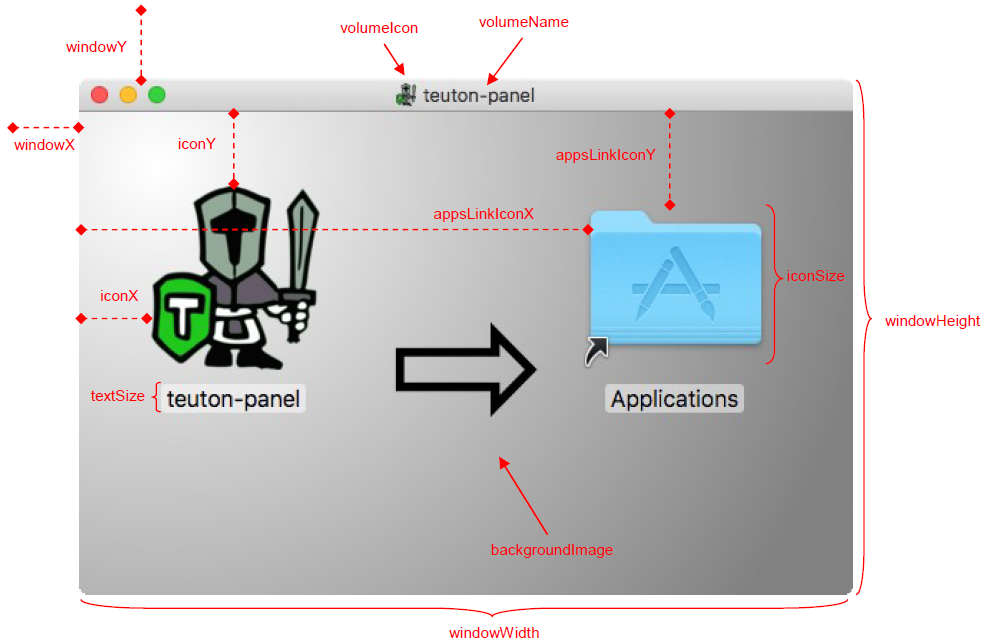
backgroundImage | built-in image | DMG window background. |
windowX | 10 | X coordinate of the DMG window on screen. |
windowY | 60 | Y coordinate of the DMG window on screen. |
windowWidth | 540 | Width of the DMG window. |
windowHeight | 360 | Height of the DMG window. |
iconSize | 128 | Icon size. |
textSize | 16 | Label text size. |
iconX | 52 | X coordinate of the app icon, relative to the window. |
iconY | 116 | Y coordinate of the app icon, relative to the window. |
appsLinkIconX | 360 | X coordinate of the Applications link, relative to the window. |
appsLinkIconY | 116 | Y coordinate of the Applications link, relative to the window. |
volumeIcon | the app icon | Icon of the mounted DMG volume (ICNS). |
volumeName | name | Name of the mounted volume. Whitespace is removed. |
Launchers
The launcher is the executable macOS runs when the app is opened. It reads the JavaX dictionary of Info.plist (main class, class path, VM options, arguments) and starts the JVM, the bundled one if there is any.
macStartup | Launcher |
|---|---|
UNIVERSAL | Native launcher, universal binary: runs natively on Apple Silicon and Intel. Default since 2.0.0. |
X86_64 | Native launcher, Intel only. |
ARM64 | Native launcher, Apple Silicon only. |
SCRIPT | Bash script (universalJavaApplicationStub.sh). Default up to 1.7.6. |
The native launcher is maintained in javapackager/nativeJavaApplicationStub. Whatever the type, it's written as Contents/MacOS/universalJavaApplicationStub.
To keep the launcher used up to 1.7.6, set <macStartup>SCRIPT</macStartup> (Gradle: macStartup = MacStartup.SCRIPT).
App bundle layout
${name}.app/
└── Contents/
    ├── Info.plist
    ├── MacOS/
    │   ├── universalJavaApplicationStub   # launcher
    │   └── startup                        # only with administratorRequired
    ├── Resources/
    │   ├── ${name}.icns
    │   ├── scripts/                       # only with a bootstrap script
    │   └── Java/                          # with relocateJar (default)
    │       ├── ${name}-${version}-runnable.jar
    │       └── libs/
    └── PlugIns/                           # only with bundleJre
        └── jre.jre/Contents/Home/         # the JRE
Info.plist holds the bundle keys (CFBundleIdentifier from appId, CFBundleName and CFBundleDisplayName from displayName, CFBundleShortVersionString and CFBundleVersion from version, NSHumanReadableCopyright from organizationName), the file associations, LSEnvironment (JAVA_HOME of the bundled JRE, PATH from envPath), and the JavaX dictionary:
JavaX key | Value |
|---|---|
MainClass | mainClass |
ClassPath | The app JAR, followed by the classpath entries |
VMOptions | vmArgs |
Arguments | appArgs |
JVMVersion | ${jreMinVersion}+, when no JRE is bundled |
WorkingDirectory | Contents/Resources |
JVMOptionsFile | Contents/Resources/${name}.l4j.ini (see runtime JVM options) |
BootstrapScript | The bootstrap script, if any |
Running as administrator
With administratorRequired, CFBundleExecutable is a startup script that runs the launcher through osascript ... with administrator privileges. macOS asks for an administrator's user name and password every time the app starts, and the app runs as root.
DMG
The DMG is built with hdiutil and laid out in Finder with AppleScript: the app icon, a link to /Applications, the background image and the positions above. It needs the Xcode command line tools (SetFile) and permission for the build to control Finder.
The image uses APFS when the build runs on an Apple Silicon JVM, and HFS+ otherwise.
PKG
The PKG is built with pkgbuild and installs the app in /Applications. Its install location, identifier and scripts can't be configured.
Building on other platforms
With platform=mac you can build the .app, zipball and tarball on GNU/Linux or Windows; to bundle a JRE, set jdkPath to a macOS JDK (see bundling a JRE). Code signing, notarization, the DMG and the PKG need macOS and are skipped elsewhere.
An app built off macOS isn't signed, and Apple Silicon Macs refuse to run unsigned apps. Sign it on a Mac before distributing it (at least ad-hoc: codesign --force --deep -s - MyApp.app).